OCR + LLM Pipeline for Contract Review: What Actually Works in Production (2026)
Introduction and Problem Statement
If you’ve ever tried to extract data from legal contracts, financial reports, or dense PDFs, you already know the pain. You throw a standard OCR tool at a 20-page multi-column document, and it spits out a garbled mess.
Contracts are notoriously difficult to parse. They aren’t just simple top-to-bottom text. They are a chaotic mix of multi-column layouts, dense tabular data, indented paragraphs, and signature blocks.
Standard OCR reads left-to-right, line-by-line. But humans don’t read like that. We read columns, we understand visual hierarchies, and we naturally skip across tables.
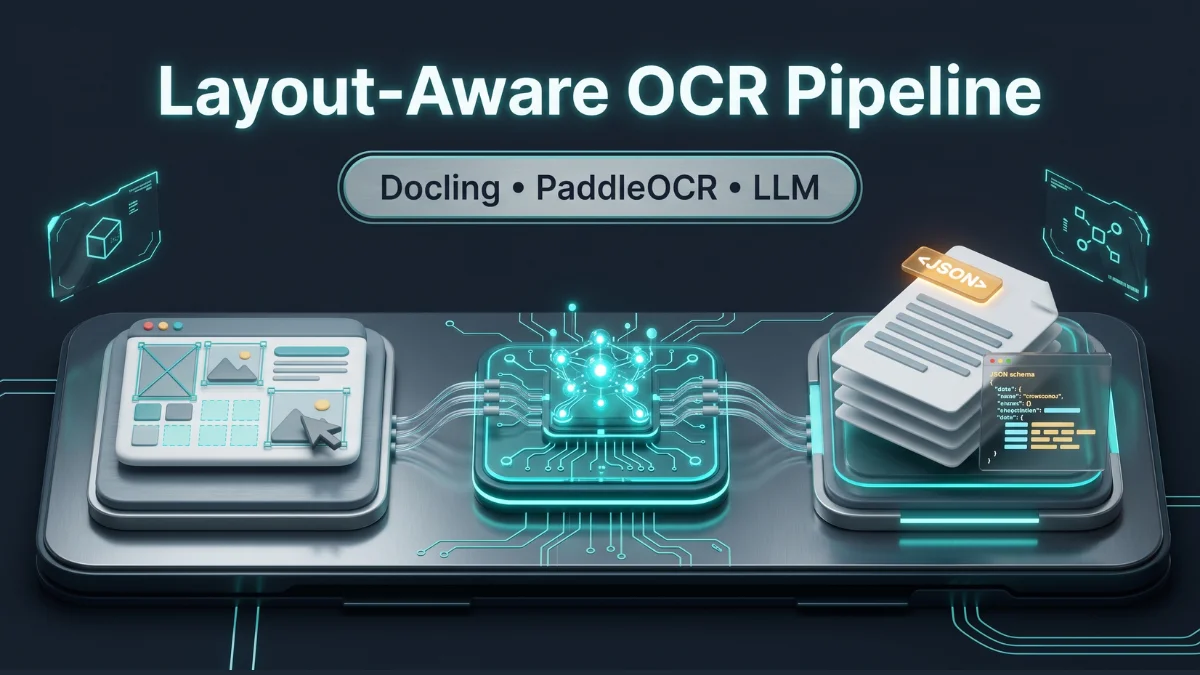
So, I built a pipeline that actually sees the document the way a human does. By combining Layout Aware OCR (using Docling and PaddleOCR) with an LLM (via Groq, though you can easily swap in OpenAI or Anthropic), I created a system that cleanly extracts key terms, clauses, and structured data from the messiest contracts.
In this post, I’ll walk you through the architecture, why layout awareness is an absolute game-changer, the shockingly low cost of running this at scale, and exactly how the code fits together.
Layout Aware OCR: The Architecture
To solve this, I broke the pipeline down into four distinct, highly focused stages.
1. Layout Extraction & Reading Order (Docling)
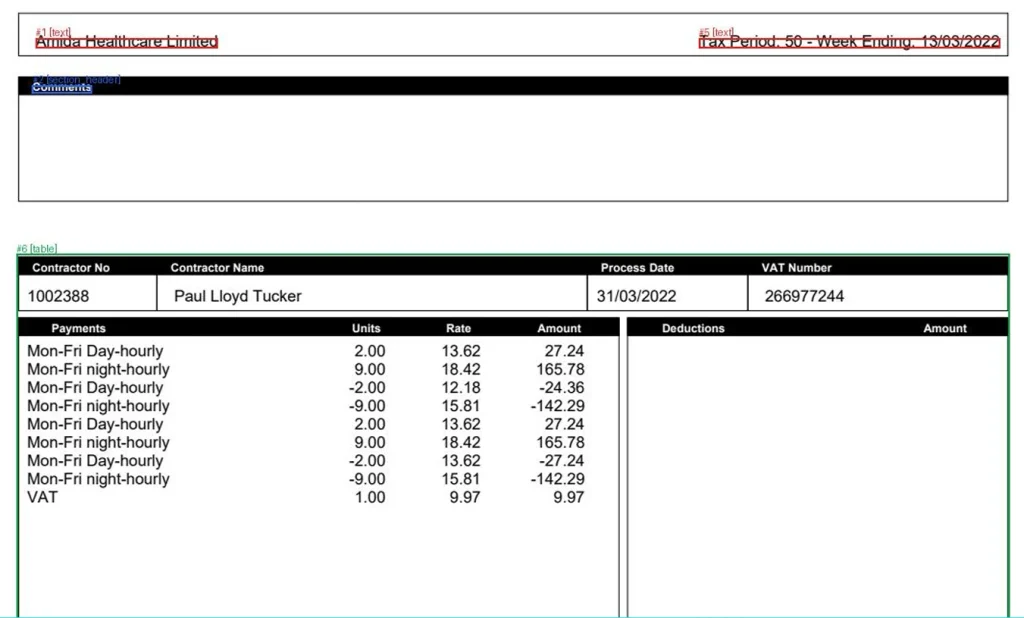
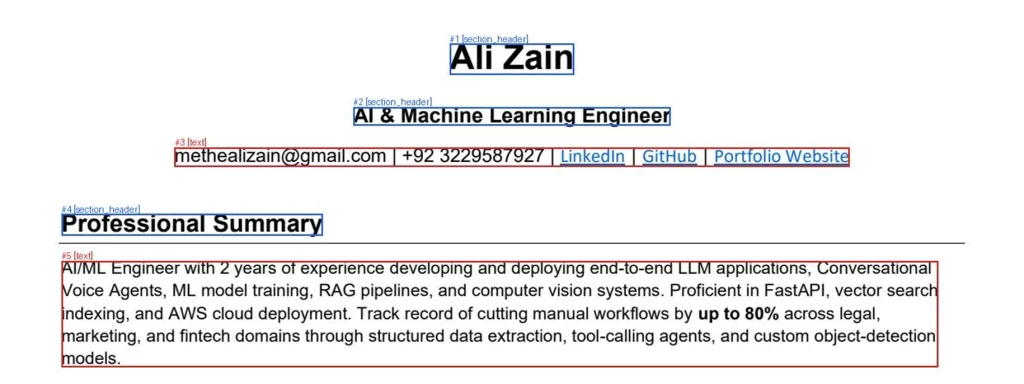
First, we pass the PDF through Docling. Docling is fantastic at understanding document structure. It identifies tables, images, headers, and paragraphs. More importantly, it calculates the bounding boxes (Top, Left, Bottom, Right coordinates) and establishes a logical reading sequence. It knows to read the left column before the right column.
2. Smart Cropping
Instead of OCRing the whole page at once, we use Docling’s bounding boxes to crop the PDF into isolated images. If Docling identifies a table, we crop just the table. If it identifies a paragraph, we crop just the paragraph.
3. Precision OCR (PaddleOCR)
We pass these perfectly cropped, isolated images to PaddleOCR. Because each image only contains a single logical block (like one column of text or one specific table), PaddleOCR doesn’t get confused by adjacent columns. It extracts the text flawlessly, and importantly, it returns the local bounding box coordinates for every single line of text it finds.
4. LLM Extraction
Finally, we take this clean, logically ordered text and hand it off to an LLM. I used the gpt-oss-20b hosted on Groq for blazing-fast inference, but you can easily point this to OpenAI or Anthropic. The LLM receives pristine text and uses a strict JSON schema to extract exactly what you ask for, be it key terms, specific clauses, or liability limits.
LLM here can be used to return data as you define in schema, or you can ask LLM to review contract based on your own defined rules. So, LLM can work here as structured data extraction + getting OCR data and reviewing the contract and returning true/false for your defined rules.
Here is another read on: Invoice Data Extraction using GPT
Let’s Talk Cost: Is it Expensive to Run?
A common myth in the AI engineering space is that throwing an LLM at an OCR pipeline will bankrupt you. Let’s look at the actual math.
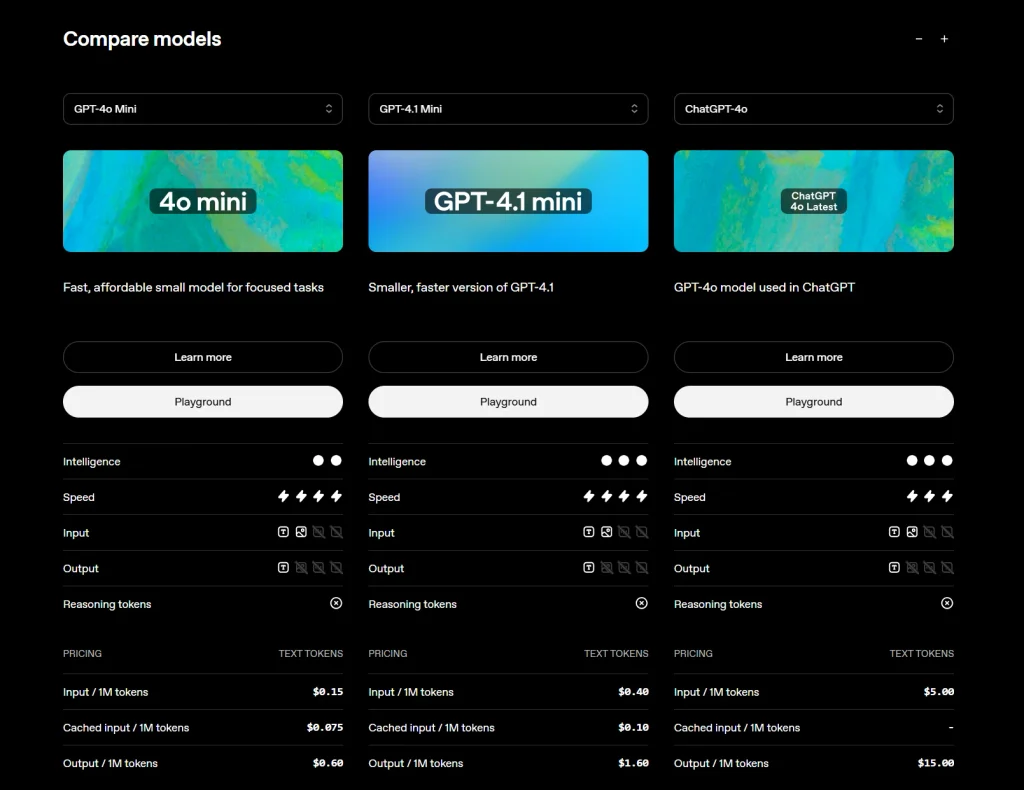
Based on the pricing for ultra-efficient “mini” models (like the gpt-5.4-mini tier or gpt-4o-mini), input tokens are dirt cheap. A dense 10 to 20-page contract usually yields about 10,000 to 15,000 tokens of clean OCR text once the layout is properly parsed.
At current mini-model rates (often around $0.15 per 1 million input tokens), feeding a 20-page contract into the LLM costs about $0.0018 to $0.002. See and compare any OpenAI model here.
Yes, you read that right. It costs a fraction of a cent to extract structured clauses, dates, and liabilities from a 20-page legal document. You can process thousands of contracts for the price of a cup of coffee. The ROI on adding an LLM to your extraction pipeline is massive when the context is this clean.
The Code Walkthrough
Let’s look at how this actually comes together in Python. I’ve modularized the pipeline so you can drop these components into your own projects.
Layout Extraction
import json
from app.schemas import ContractExtraction

class PDFLayoutExtractor:
    """Extracts text, tables, and corrected reading order from a PDF via Docling."""

    def __init__(
        self,
        table_mode: TableFormerMode = TableFormerMode.ACCURATE,
        render_scale: float = 2.0,
    ):
        self.render_scale = render_scale
        pipeline_options = PdfPipelineOptions()
        pipeline_options.do_ocr = True
        pipeline_options.do_table_structure = True
        pipeline_options.table_structure_options.mode = table_mode
        self.converter = DocumentConverter(
            format_options={InputFormat.PDF: PdfFormatOption(pipeline_options=pipeline_options)}
        )

    @staticmethod
    def _sort_reading_order(blocks: list, page_w: float) -> list:
        """Column-first sort: left column, then right column, each top-to-bottom."""
        mid_x = page_w / 2.0
        left_col, right_col = [], []
        for block in blocks:
            center_x = (block["bbox"]["l"] + block["bbox"]["r"]) / 2.0
            (left_col if center_x < mid_x else right_col).append(block)

        # Docling's origin is bottom-left, so a larger `t` is higher on the page.
        left_col.sort(key=lambda item: item["bbox"]["t"], reverse=True)
        right_col.sort(key=lambda item: item["bbox"]["t"], reverse=True)
        return left_col + right_col

    @staticmethod
    def _extract_blocks(doc) -> dict:
        raw_page_blocks: dict = {}
        for item, _ in doc.iterate_items():
            if not getattr(item, "prov", None):
                continue

            label = str(item.label).lower().replace("docitemlabel.", "")
            text = getattr(item, "text", "")
            table_html = (
                item.export_to_html(doc)
                if label == "table" and hasattr(item, "export_to_html")
                else None
            )
            for prov in item.prov:
                page_idx = prov.page_no - 1
                raw_page_blocks.setdefault(page_idx, []).append({
                    "label": label,
                    "text": text,
                    "table_html": table_html,
                    "bbox": {
                        "l": prov.bbox.l,
                        "t": prov.bbox.t,
                        "r": prov.bbox.r,
                        "b": prov.bbox.b,
                    },
                })
        return raw_page_blocks

    def _annotate_page(self, img: Image.Image, ordered_blocks: list) -> Image.Image:
        draw = ImageDraw.Draw(img)
        img_h = img.height
        for seq_idx, block in enumerate(ordered_blocks, start=1):
            bbox = block["bbox"]
            color = LABEL_COLORS.get(block["label"], DEFAULT_COLOR)
            x0 = bbox["l"] * self.render_scale
            x1 = bbox["r"] * self.render_scale
            y0 = img_h - (bbox["t"] * self.render_scale)
            y1 = img_h - (bbox["b"] * self.render_scale)
            draw.rectangle([x0, y0, x1, y1], outline=color, width=2)
            draw.text((x0, max(0, y0 - 12)), f"#{seq_idx} [{block['label']}]", fill=color)
        return img.convert("RGB")

    def process(self, pdf_path: Path) -> DocumentResult:
        pdf_path = Path(pdf_path)
        doc = self.converter.convert(pdf_path).document
        raw_page_blocks = self._extract_blocks(doc)
        pdf = pdfium.PdfDocument(str(pdf_path))
        pages: list[PageResult] = []

        for page_idx, page in enumerate(pdf):
            image = page.render(scale=self.render_scale).to_pil()
            page_w = image.width / self.render_scale
            ordered_blocks = self._sort_reading_order(raw_page_blocks.get(page_idx, []), page_w)
            pages.append(PageResult(
                page_number=page_idx + 1,
                reading_sequence=ordered_blocks,
                annotated_image=self._annotate_page(image, ordered_blocks),
            ))

        return DocumentResult(
            file_name=pdf_path.name,
            markdown=doc.export_to_markdown(),
            pages=pages,
)Image Cropper
from pathlib import Path
import pypdfium2 as pdfium

def crop_pdf_regions(
    pdf_path: Path,
    pages_blocks: list,
    output_base_dir: Path,
    scale: float = 2.0,
) -> dict[int, list[str]]:
    """Render each page and crop the layout blocks. Returns page number to crop paths."""
    pdf = pdfium.PdfDocument(str(pdf_path))
    pdf_out_dir = output_base_dir / pdf_path.stem / "crops"
    pdf_out_dir.mkdir(parents=True, exist_ok=True)
    crops_per_page: dict[int, list[str]] = {}

    for page_idx, page in enumerate(pdf):
        image = page.render(scale=scale).to_pil()
        img_h = image.height
        page_num = page_idx + 1
        crops_per_page[page_num] = []

        page_data = next((item for item in pages_blocks if item["page_number"] == page_num), None)
        if not page_data:
            continue

        for idx, block in enumerate(page_data["reading_sequence"], start=1):
            bbox = block["bbox"]
            # PDF origin is bottom-left; PIL origin is top-left.
            x0 = int(bbox["l"] * scale)
            x1 = int(bbox["r"] * scale)
            y0 = int(img_h - (bbox["t"] * scale))
            y1 = int(img_h - (bbox["b"] * scale))
            crop_path = pdf_out_dir / f"p{page_num}_block{idx}_{block['label']}.png"
            image.crop((x0, y0, x1, y1)).save(crop_path)
            crops_per_page[page_num].append(str(crop_path))

return crops_per_pageOCR (PaddleOCR)
from pathlib import Path
from paddleocr import PaddleOCR


class OcrEngine:
    def __init__(self) -> None:
        # use_angle_cls is the 2.x name; PaddleOCR 3.x maps it to use_textline_orientation.
        self._ocr = PaddleOCR(use_angle_cls=True, lang="en", enable_mkldnn=False)

    def extract(self, crop_paths: list[str]) -> list[dict]:
        results = []
        for path_str in crop_paths:
            path = Path(path_str)
            # 3.x ocr() forwards kwargs into predict(), which rejects the old cls= flag.
            if hasattr(self._ocr, "predict"):
                ocr_result = self._ocr.predict(str(path))
            else:
                ocr_result = self._ocr.ocr(str(path), cls=True)

            lines = []
            combined_text = []
            for text, score, poly_box in _iter_ocr_lines(ocr_result):
                combined_text.append(text)
                lines.append({
                    "text": text,
                    "confidence": round(float(score), 4),
                    "local_box": _as_box(poly_box),
                })
            results.append({
                "crop_file": path.name,
                "raw_text": " ".join(combined_text),
                "lines": lines,
            })
return resultsData Extraction
import json
from openai import OpenAI
from app.schemas import ContractExtraction


def strict_json_schema(model: type[ContractExtraction]) -> dict:
    """Groq strict json_schema requires additionalProperties false on every object."""
    schema = model.model_json_schema()

    def mark(node):
        if isinstance(node, dict):
            if node.get("type") == "object" or "properties" in node:
                node["additionalProperties"] = False
            for value in node.values():
                mark(value)
        elif isinstance(node, list):
            for item in node:
                mark(item)

    mark(schema)
    return schema


def extract_contract(ocr_text: str, client: OpenAI, model: str) -> ContractExtraction:
    completion = client.chat.completions.create(
        model=model,
        messages=[
            {
                "role": "system",
                "content": "Extract target contract details strictly from the provided OCR text.",
            },
            {"role": "user", "content": ocr_text},
        ],
        response_format={
            "type": "json_schema",
            "json_schema": {
                "name": "ContractExtraction",
                "strict": True,
                "schema": strict_json_schema(ContractExtraction),
            },
        },
    )
    raw_content = completion.choices[0].message.content or "{}"
return ContractExtraction.model_validate(json.loads(raw_content))Pipeline
import logging
import threading
from pathlib import Path
from openai import OpenAI
from app.config import Settings
from app.schemas import DocumentExtraction
from app.services.cropper import crop_pdf_regions
from app.services.extraction import extract_contract
from app.services.store import DocumentStore


class Pipeline:
    """Layout, crop, OCR, then field extraction. Models are loaded once."""

    def __init__(self, settings: Settings):
        # Imported here so the API process can start without loading Docling and Paddle.
        from app.services.layout import PDFLayoutExtractor
        from app.services.ocr import OcrEngine

        self.settings = settings
        self.store = DocumentStore(settings)
        self._lock = threading.Lock()
        self.layout = PDFLayoutExtractor(render_scale=settings.render_scale)
        self.ocr = OcrEngine()
        self.client = (
            OpenAI(api_key=settings.groq_api_key, base_url=settings.groq_base_url)
            if settings.groq_api_key
            else None
        )

    def run(self, pdf_path: Path) -> DocumentExtraction:
        client = self.client
        if client is None:
            raise MissingApiKeyError("GROQ_API_KEY is not set")
        with self._lock:
            return self._run(pdf_path, client)

    def _run(self, pdf_path: Path, client: OpenAI) -> DocumentExtraction:
        pdf_path = Path(pdf_path)
        stem = pdf_path.stem
        logger.info("Processing %s", pdf_path.name)

        try:
            layout = self.layout.process(pdf_path)
            layout.save(
                self.settings.json_dir,
                self.settings.markdown_dir,
                self.settings.processed_pdf_dir,
                stem,
            )
            crops = crop_pdf_regions(
                pdf_path=pdf_path,
                pages_blocks=layout.to_json_dict()["pages"],
                output_base_dir=self.settings.crops_dir,
                scale=self.settings.render_scale,
            )
            crop_paths = [path for paths in crops.values() for path in paths]
            ocr_blocks = self.ocr.extract(crop_paths)
            ocr_text = "\n".join(block["raw_text"] for block in ocr_blocks if block["raw_text"])
            extracted = extract_contract(ocr_text, client, self.settings.groq_model)
            payload = DocumentExtraction(
                file_name=pdf_path.name,
                extracted_data=extracted,
                raw_ocr_blocks=ocr_blocks,
            )
        except Exception as exc:
            logger.exception("Failed to process %s", pdf_path.name)
            raise PipelineError(f"Could not process {pdf_path.name}") from exc

        output = self.store.save_extraction(stem, payload)
        logger.info("Saved %s", output.name)
return payloadEvaluation & Failure Modes
In this layout aware ocr pipeline docling correctly identifies the paragraphs, texts, images, and tables 99% of the times, but there can be some structures where it can confidently create bounding boxes around text in two different boxes, or regions. An example is shown below:
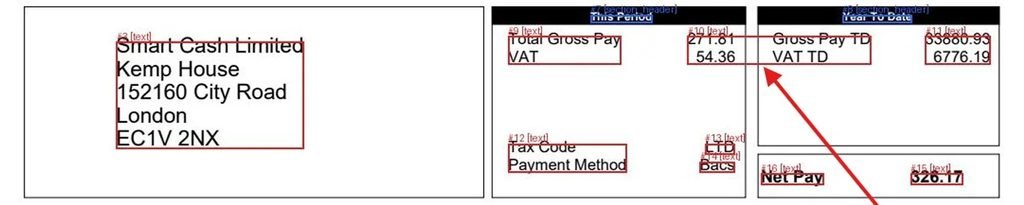
This approach is perfectly fine for text-based or good-looking, decent pdf’s, but the failure mode starts on skewed-scan PDFs, watermarks, handwritten signatures, and stamps that are not extracted accurately with all this.
Wrapping Up
Building a robust layout aware document data extraction pipeline isn’t just about stringing together an OCR library and an LLM API. It’s about respecting the document’s physical reality. By isolating layout blocks and enforcing a human-like reading order, you bridge the gap between raw pixels and semantic understanding.
The result? A system that doesn’t just read text, but actually comprehends the structure of complex contracts, at a cost so low it’s practically negligible.
Want the full, runnable code? I’ve refactored this exact pipeline into a production-ready FastAPI service, complete with dependency injection, async processing, and Docker support. You can find the public repository here on GitHub.
Happy coding, and may your OCR bounding boxes always align perfectly!
Want to Build This for your Agency?
Build a production-ready pipeline that protects deliverability, minimizes latency, gives accuracy and scales cleanly without technical debt.
Contact Me →