FastAPI + Docker + Celery: Deploying an Async AI Worker Pipeline That Doesn’t OOM
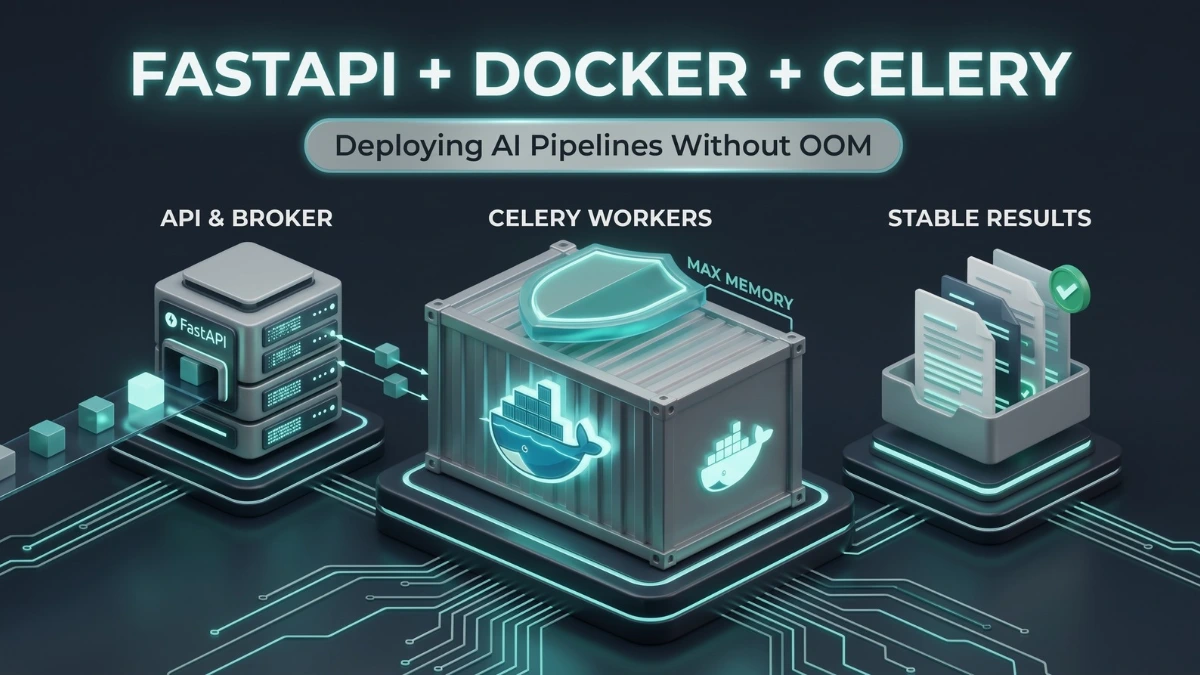
Your Celery worker is probably not leaking in the classic sense. It is doing what prefork workers do, and your Docker memory limit has no idea.
I build document pipelines for a living (legal, real estate, payroll), and the same failure shows up every time a model moves from a notebook into a long-lived worker. It runs fine for 40 requests, then tasks start dying and sometimes the whole container restarts. No Python traceback.
Short answer: A Celery worker OOM (out of memory)
kill happens because prefork children keep their peak memory, so each
child in a long-lived AI worker ratchets up until the kernel sends
signal 9. The fix is a per child memory cap
(worker_max_memory_per_child, which is in KiB, not bytes),
a Docker limit sized from measured peaks, and
worker_proc_alive_timeout set above your model load
time.
This is a hands-on guide. You will reproduce the kill, fix it, and
check the result with your own numbers. Every file below is in the
companion repo, and you can run both stacks with plain
docker compose.
One setting in most tutorials has the wrong unit, and it silently turns the safety net off. I will point at it when we get there.
client -> FastAPI (returns 202 + job_id) -> Redis (broker)
                                              |
                                      Celery worker (prefork)
                                       |-- child 1 [model copy]
                                       |-- child 2 [model copy]
                                              |
client <- GET /jobs/{id} <------------- Redis (results)What you need
Docker with Compose v2. The repro needs 1 GB of RAM. The fixed stack needs about 8 GB allocated to Docker (on Docker Desktop, check Settings, Resources), because it runs a real model. On a smaller machine, see the note in the run section.
project/
  repro/   tasks.py, enqueue.py, Dockerfile, requirements.txt, docker-compose.yml
  fixed/   worker.py, api.py, celeryconfig.py, load_test.py, .env,
           Dockerfile, requirements.txt, docker-compose.yml, data/sample.txt
The failure leaves almost no trace
Three places to look, because each one tells you something different.
docker inspect --format='Exit={{.State.ExitCode}} OOM={{.State.OOMKilled}}' <container>
docker logs <container> 2>&1 | grep -i "signal 9"
dmesg | grep -i "killed process" # on the hostExit code 137 is 128 + 9, so SIGKILL. No Python code can catch it.
One detail that confuses people: the kernel usually kills the biggest process in the cgroup, which is a pool child, not the Celery parent. The container keeps running, and you only see
WorkerLostError: Worker exited prematurely: signal 9 (SIGKILL)in the log. You get exit 137 on the container only when the parent dies
too. If you only watch container restarts, you will miss most of
these.
Why AI workers hit this and web workers don’t
A prefork child is a long-lived process. Once it touches memory, the allocator often keeps it, so RSS ratchets up to the peak of the largest document it ever saw and stays there.
Three things make AI workloads worse than a normal web app:
- Every child holds its own model. Concurrency 2 means two copies of the weights.
distilbart-cnn-12-6is roughly 1.2 GB in FP32, so the baseline is already 2.4 GB before any request arrives. Measured on the fixed stack below, each child sat at 1.6 GiB RSS (1568 to 1688 MiB over 200 tasks) and the container at about 3.3 GiB, while the Celery parent itself was only 50 MiB. - Fork does not save you. Loading the model in the parent and forking sounds like free sharing, but Python refcounts touch pages and break copy-on-write. With CUDA it is worse, because you cannot initialize CUDA in the parent and then fork.
- Peak memory follows input length. A 3-page contract and a 300-page filing do not cost the same, and the worker remembers the expensive one.
Prefetch gets blamed for this a lot. It is mostly a red herring. Prefetched messages are small payloads in the parent process, not model memory. The real prefetch problem is latency: a long task sits reserved behind another long task while other workers idle.
Reproduce it in two minutes
You do not need a GPU or real weights. A task that retains 25 MB per call behaves like a model runtime that never gives memory back.
# repro/tasks.py
import os
from celery import Celery

app = Celery("repro", broker=os.getenv("REDIS_URL", "redis://redis:6379/0"))
RETAINED = []  # stands in for allocator and tensor cache growth

@app.task(name="leak")
def leak(i: int) -> int:
    RETAINED.append(bytearray(b"x") * (25 * 1024 * 1024))
    return len(RETAINED)
# repro/docker-compose.yml
services:
redis:
image: redis:7-alpine
worker:
build: .
command: celery -A tasks worker -l info --concurrency=2
environment:
- REDIS_URL=redis://redis:6379/0
depends_on:
- redis
memswap_limit: 1g
deploy:
resources:
limits:
memory: 1gmemswap_limit: 1g matters. When the host has swap enabled, Docker gives a container swap equal to its memory limit by default, so a bare 1g limit really means 2 GiB of RAM plus swap. I first ran this without that line and the first kill came after 80 tasks instead of the 40 the math predicts, because docker inspect showed MemorySwap=2147483648. Pinning swap to the limit makes the repro honest, and it is also what you want in production if you would rather get a clean kill than a swapping worker.
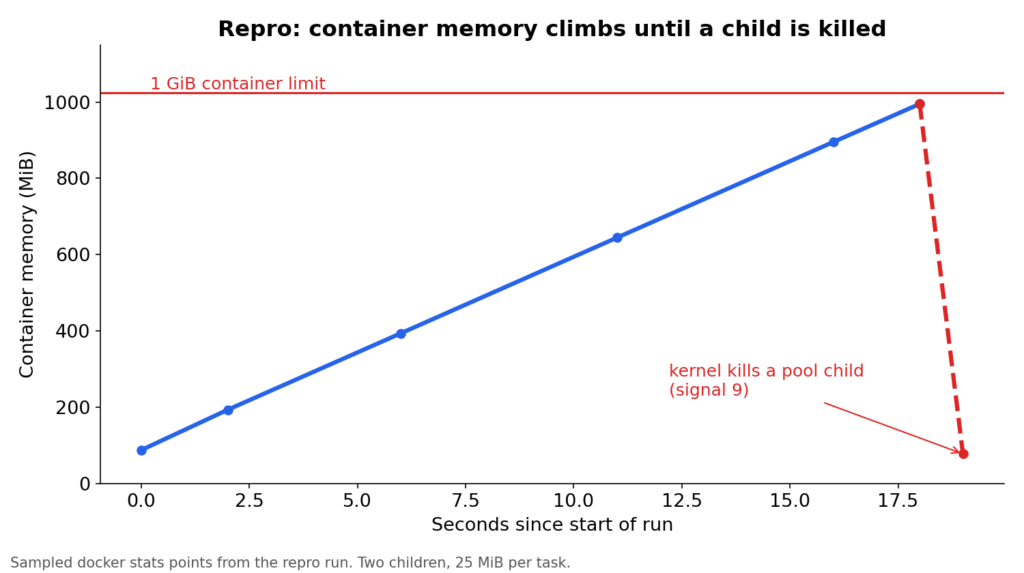
enqueue.py calls leak.delay(i) 100 times with a half second pause, so the climb is slow enough to watch. Open three terminals:
cd repro
docker compose up -d --build
docker compose exec worker python enqueue.py     # terminal 1
docker stats                                     # terminal 2
docker compose logs -f worker # terminal 3</code></pre>The math: 1 GiB divided by 25 MiB is about 41 tasks before interpreter overhead, so expect the kill somewhere in the mid 30s. This is what docker stats showed on my machine, sampled from the start of the run to the first kill (times in UTC, the same clock as the worker log):
16:11:44   87.43MiB / 1GiB   8.54%
16:11:46  193.2MiB / 1GiB  18.86%
16:11:50  393.6MiB / 1GiB  38.44%
16:11:55  644.4MiB / 1GiB  62.93%
16:12:00  895.1MiB / 1GiB  87.41%
16:12:02  995.1MiB / 1GiB  97.18%
16:12:03 77.33MiB / 1GiB 7.55% <- the kernel killed a pool childIt is a straight line, 50 MiB per second (two children, 25 MiB each per second). The drop is the child dying, and the climb then starts again. The worker log shows the same moment:
[2026-10-24 16:12:02,851: ERROR/MainProcess] Process 'ForkPoolWorker-1' pid:8 exited with 'signal 9 (SIGKILL)'
[2026-10-24 16:12:02,865: ERROR/MainProcess] Task handler raised error: WorkerLostError('Worker exited prematurely: signal 9 (SIGKILL) Job: 37.')The first kill came after 37 tasks had completed, and a second one hit at job 75. Of the 100 tasks, 98 finished and 2 were lost for good, because the default early ack means a task that dies mid run is not retried.
Then confirm it, and clean up:
docker compose logs worker | grep -i "signal 9"
docker inspect --format='Exit={{.State.ExitCode}} OOM={{.State.OOMKilled}}' $(docker compose ps -q worker)
docker compose down
Exit=0 OOM=true
Read that output carefully. The container never stopped (Restarts=0, status still running), yet Docker already reports OOM=true. A pool child was killed and the parent kept going, which is exactly the case that restart-based alerting misses. OOM=true with exit 0 on a running container is the signature.
The worker: load once per child, pass ids not text
Two decisions matter here. Load the model in worker_process_init so each child loads it exactly once. And never put document text in the message. Pass an id and let the worker fetch it, otherwise your broker and your prefetch buffer carry the documents.
# fixed/worker.py
import os, redis
from celery import Celery
from celery.signals import worker_process_init
app = Celery("summ")
app.config_from_object("celeryconfig")
_r = redis.Redis.from_url(os.environ["REDIS_URL"])
_model = None

def fetch_text(doc_id): return open(f"/data/{doc_id}.txt").read()  # swap for DB or S3

@worker_process_init.connect
def load_model(**_):
    global _model
    from transformers import pipeline  # import inside the child
    _model = pipeline("summarization", model="sshleifer/distilbart-cnn-12-6", device=-1)

@app.task(name="summarize", bind=True)
def summarize(self, doc_id):
    key = f"attempts:{self.request.id}"  # same id on every redelivery
    if _r.incr(key) > 2:                 # poison pill guard
        return {"error": "too_many_attempts"}
    _r.expire(key, 3600)
    out = _model(fetch_text(doc_id), max_length=130, min_length=30, truncation=True)
    return {"summary": out[0]["summary_text"]}
Note truncation=True. BART style models cap input at around 1024 tokens, and capping input length is the single best lever you have on per task peak memory. For long documents, chunk first, then summarize the chunks.
The API side stays boring on purpose:
# fixed/api.py
from fastapi import FastAPI
from celery.result import AsyncResult
from worker import app as celery_app, summarize

api = FastAPI()

@api.post("/summarize", status_code=202)
def submit(doc_id: str):
    job = summarize.apply_async(args=[doc_id], queue="summarize")
    return {"job_id": job.id}

@api.get("/jobs/{job_id}")
def status(job_id: str):
    res = AsyncResult(job_id, app=celery_app)
return {"state": res.state, "result": res.result if res.ready() else None}One gotcha: Celery reports PENDING for any unknown id, including typos and expired results. Do not treat PENDING as proof the job exists.
The config that actually matters
Put it in one place. If you set the same value in celeryconfig.py and on the CLI, the CLI wins and nobody remembers which one is live. The values come from .env so you can tune them without rebuilding.
# fixed/celeryconfig.py
import os

broker_url = result_backend = os.environ["REDIS_URL"]
worker_concurrency = int(os.getenv("CONCURRENCY", "2"))
worker_prefetch_multiplier = 1
worker_max_tasks_per_child = 100                                        # backstop, prefork only
worker_max_memory_per_child = int(os.getenv("MAX_MEM_KIB", "2500000"))  # KiB, not bytes
worker_proc_alive_timeout = 60                                         # must exceed model load time, default is 4 s
task_acks_late = True
task_reject_on_worker_lost = True
task_time_limit = 300
task_soft_time_limit = 240
result_expires = 3600
broker_transport_options = {"visibility_timeout": 900}  # must exceed task_time_limit
Now the parts that bite.
The unit is KiB, not bytes. Several guides tell you worker_max_memory_per_child moved to bytes in newer Celery, and show a value like 419430400 for 400 MB. It did not. I checked the billiard source behind Celery 5.6.3: after each task, the child reads its RSS in KiB and compares it to your number. Set 419430400 and the child would need about 400 GB to recycle. The safety net never fires, and you will not notice until the OOM kill.
I also checked it on a running worker. With MAX_MEM_KIB=2250000 and children sitting at 1.6 GiB RSS, nothing recycled over 12 tasks. If that number were bytes, every child would have been recycled after every task. With MAX_MEM_KIB=1000000, which is below the 1.7 million KiB peak, every child recycled after one task.
On Linux the check reads peak RSS. It uses getrusage and ru_maxrss, which is a high-water mark that never goes down. So the question Celery asks is “has this child ever crossed the cap”, and a short spike while loading the model counts. Log the same number the check uses (the verify section does), and set the cap from that.
The check runs after the task finishes. It recycles a bloated child, but it cannot stop one huge document from blowing past the limit mid task. This is why the Docker limit needs headroom above the cap (next section).
Do not set the cap below your steady state. If the peak is already 2 GiB and you cap at 1 GiB, every task triggers a recycle and a model reload. Celery’s own docs warn about this failure mode. Set the cap at your measured peak plus the growth you are willing to tolerate.
worker_max_tasks_per_child is a blunt backstop. It only works with the prefork pool. Treat it as a ceiling and let the memory cap do the real work.
Every recycle starts a child that has to load the model, and Celery gives it 4 seconds. This one cost me a stuck worker. worker_proc_alive_timeout defaults to 4.0 seconds: a new pool child that has not reported in by then is killed with SIGKILL and replaced. The two children started at boot survived, so the worker looks healthy. But my model takes 7 to 17 seconds to load in worker_process_init, so the first recycle broke everything.
In my 200 job run, both children hit worker_max_tasks_per_child after exactly 100 tasks each. The log then filled with this (13 timeouts in the first 30 seconds), and no replacement child ever came up:
[2026-10-24 17:53:53,838: ERROR/MainProcess] Timed out waiting for UP message from <ForkProcess(ForkPoolWorker-3, started daemon)>
[2026-10-24 17:53:53,880: ERROR/MainProcess] Process 'ForkPoolWorker-3' pid:48 exited with 'signal 9 (SIGKILL)'
[2026-10-24 17:53:58,031: ERROR/MainProcess] Timed out waiting for UP message from <ForkProcess(ForkPoolWorker-4, started daemon)>
That is signal 9 again, but it is Celery killing its own child, not the OOM killer. Container memory is flat, OOMKilled stays false, and a grep "signal 9" check would send you hunting for a memory problem that is not there. The fix is the one line in the config above: set worker_proc_alive_timeout well above your slowest model load. With it at 60, the recycled children loaded in 10 to 13 seconds and stayed up.
One more thing in that log: both children hit 100 tasks together, because the queue spreads work evenly. They recycle in lockstep, so for the length of one model load your worker has no children at all. The repo ships with 100 so a 200 job run shows the recycle. In production I would raise it a lot and let the memory cap do the recycling, which is rule 3 below.
visibility_timeout must be longer than task_time_limit. With Redis and late acks, a task that outlives the visibility timeout gets redelivered to another worker and runs twice. The default is one hour, which hides the problem until you add a long task.
Late acks need a poison pill guard. With task_acks_late and task_reject_on_worker_lost, a task that OOM kills its worker goes back on the queue, kills the next worker, and repeats. That is the attempts counter in the worker above. It is keyed by task id, which stays the same across redeliveries, so a legitimate resubmit of the same document gets a fresh id and a fresh count.
Sizing the Docker limit
Celery does not know the cgroup limit exists, so the numbers have to agree on paper.
limit >= (parent + concurrency * (cap + task_peak)) * 1.1cap is your per-child memory cap, and task_peak is how far one task can push a child past it, since the check only runs afterward. These are the starting values in .env. Replace them with your measurements.
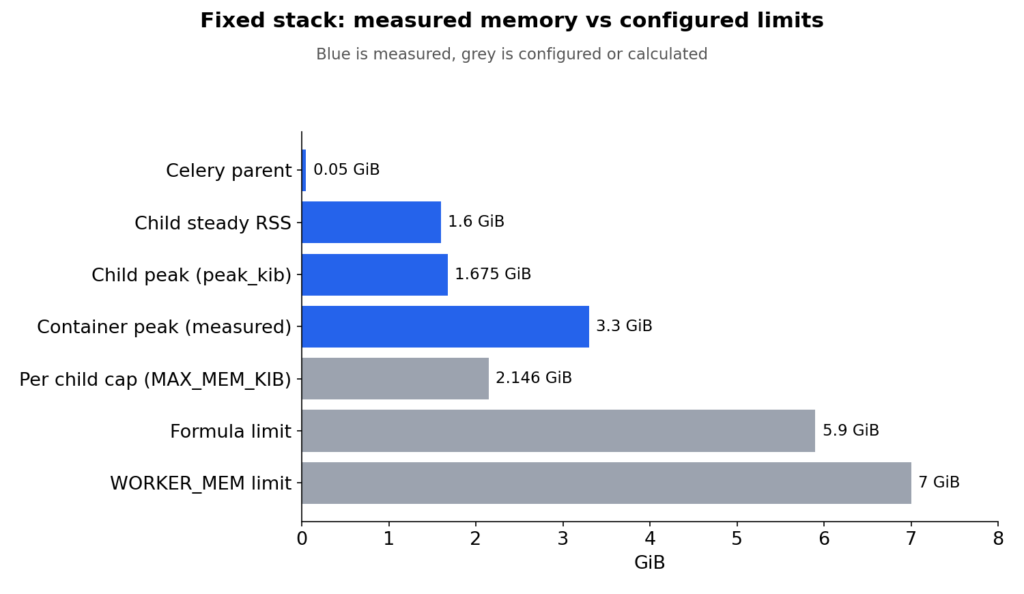
Here is the same table with my measurements. The parent was 50 MiB, not 0.3 GiB, because the model loads in the children. The highest peak_kib I saw was 1,756,528 (1.67 GiB), so the cap from the rule in the verify section is about 2,250,000 KiB (2.15 GiB).
I kept 0.5 GiB for one task past the cap, because the sample document never moved a child’s peak by more than 42 MiB (1,713,576 to 1,756,528 KiB).
That gives (0.05 + 2 x 2.65) x 1.1 = about 5.9 GiB, so 6g. The starting 7g is still comfortable, and the container peaked at only 3.3 GiB. The formula is the worst case, not the typical case.
If that number is too big for your box, lower concurrency before you lower the cap. Halving concurrency halves your model copies.
What recycling costs
Recycling is not free, because every recycle is a model reload. The amortized cost per task is reload time divided by tasks per child.
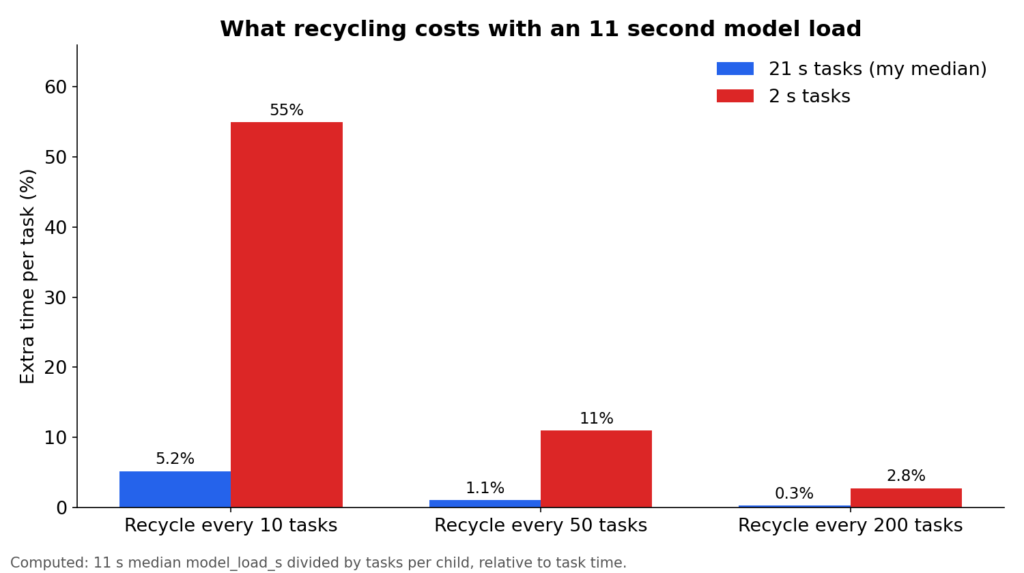
This uses an 11 second model load, the median of 16 model_load_s lines from my runs (range 6.8 to 17.3 s, and it varied with how busy the machine was). The 21 s task time is the median of 200 summaries at concurrency 2 on CPU (15 to 41 s). The fixed stack logs model_load_s for every child start, so read your real numbers from the logs and redo the table. The other child keeps serving while one reloads, but at concurrency 2 your throughput drops by half for those seconds. If a cold load costs you more than a few seconds, recycle on the memory cap and not on a low task count.
GPU notes
Keep it simple: one child per GPU. Initialize CUDA inside worker_process_init, never in the parent.
PyTorch’s caching allocator holds on to blocks it could reuse. torch.cuda.empty_cache() returns unused cached blocks to the driver, which helps when VRAM is shared, but it does not free tensors you still reference. Call it in a finally block after inference, and measure before and after. I would not put a number on how many tasks until fragmentation hurts, because it depends on your input size spread and torch version.
Run the fixed stack and verify with numbers
First, the logging that makes the rest of this guide possible. It is already in fixed/worker.py, and it prints per task memory using the same number Celery checks:
@task_postrun.connect
def log_memory(task=None, **_):
    rss_mb = psutil.Process().memory_info().rss // 2**20
    peak_kib = resource.getrusage(resource.RUSAGE_SELF).ru_maxrss  # what Celery checks
log.warning("pid=%s rss_mb=%s peak_kib=%s", os.getpid(), rss_mb, peak_kib)The compose file and the .env it reads:
# fixed/docker-compose.yml
services:
  redis:
    image: redis:7-alpine
  api:
    build: .
    command: uvicorn api:api --host 0.0.0.0 --port 8000
    env_file: .env
    ports: ["8000:8000"]
    depends_on: [redis]
  worker:
    build: .
    command: celery -A worker worker -Q summarize -l info
    env_file: .env
    volumes: ["./data:/data"]
    restart: unless-stopped
    depends_on: [redis]
    deploy:
      resources:
        limits:
          memory: ${WORKER_MEM}
# fixed/.env
REDIS_URL=redis://redis:6379/0
CONCURRENCY=2
MAX_MEM_KIB=2500000
WORKER_MEM=7gOn a machine with less than 8 GB for Docker, set CONCURRENCY=1 and WORKER_MEM=4g. The first build is slow because the image installs CPU torch and bakes the model weights in, so workers never download anything at startup. On my slow connection it took about 45 minutes, almost all of it downloading, and the Dockerfile sets PIP_DEFAULT_TIMEOUT and PIP_RETRIES because my first attempt died on a pip read timeout halfway through the torch wheel.
Step 1: start it and send one job.
cd fixed
docker compose up -d --build
curl -X POST "localhost:8000/summarize?doc_id=sample"   # returns {"job_id": "..."}
curl localhost:8000/jobs/<job_id> # state, then the summaryMy output, about 12 seconds after submitting:
{"job_id":"baaf0b60-9d7a-4752-82c4-dbea03da2df4"}
{"state":"SUCCESS","result":{"summary":" The quarterly review of the property portfolio covered forty-two commercial leases across three regions . Occupancy rose from 88 percent to 91 percent . Rental income grew by 4.2 percent year over year, but operating costs grew faster at 6.1 percent ."}}If something on your machine already uses port 8000, change ports to "8001:8000" and use 8001 in the curl commands. load_test.py calls port 8000, so run it as docker compose exec api python load_test.py 200 instead.
Step 2: hit it with 200 jobs and watch.
python load_test.py 200
docker stats                                            # terminal 2
docker compose logs -f worker | grep -E "rss_mb|model_load_s"At concurrency 2 on CPU, 200 summaries took about 36 minutes on my machine (median 21 s per task). All 200 succeeded. The two children started with model_load_s=6.8, and this is what the memory lines looked like at the beginning and the end:
17:21:33 pid=9 rss_mb=1573 peak_kib=1742432
17:30:01 pid=8 rss_mb=1602 peak_kib=1742640
17:39:04 pid=8 rss_mb=1568 peak_kib=1742640
17:53:55 pid=8 rss_mb=1596 peak_kib=1748424Over all 200 tasks rss_mb stayed between 1568 and 1688, and peak_kib between 1,713,576 and 1,748,424. docker stats showed the whole container between 1.7 and 3.3 GiB against the 7 GiB limit. That is flat, not a leak, because the sample document is the same size every time. The ratchet in this article shows up when your input lengths vary, which is why you still want the cap.
This run also ended badly, which is how I found the startup timeout problem described in the config section. Both children reached 100 tasks, worker_max_tasks_per_child recycled them, and every replacement was killed before it finished loading the model. The worker_proc_alive_timeout line in celeryconfig.py is the fix, and the steps below were run with it in place.
Step 3: set the cap from your own numbers. Take the highest peak_kib you see after a few dozen tasks, add about 500000 (roughly 0.5 GiB of growth room), put it in MAX_MEM_KIB, then run docker compose up -d to apply it. If you cap below your peak, you get the thrash described earlier.
My highest peak was 1,748,424 at that point, so I set MAX_MEM_KIB=2250000 and sent 12 more jobs. All 12 succeeded, peak_kib topped out at 1,756,528, and the only model_load_s lines in the log were the two from startup. No recycles, which is what a well set cap looks like.
Step 4: watch a recycle happen on purpose. Set MAX_MEM_KIB below your logged peak_kib, for example 1000000, and rerun the load test. Every child recycles after one task and a fresh model_load_s line appears each time. In production that same picture means your cap is too low. This is my log with MAX_MEM_KIB=1000000 and 6 jobs, with every line trimmed to its timestamp and message:
18:22:45 pid=16 model_load_s=17.0      <- startup
18:22:45 pid=17 model_load_s=17.3
18:23:40 pid=16 rss_mb=1612 peak_kib=1730528   <- over the cap, child exits
18:23:41 pid=17 rss_mb=1633 peak_kib=1711984
18:24:10 pid=56 model_load_s=10.8      <- fresh children, new pids
18:24:12 pid=57 model_load_s=12.7
18:25:10 pid=56 rss_mb=1569 peak_kib=1714960
18:25:11 pid=57 rss_mb=1568 peak_kib=1713836
18:25:40 pid=96 model_load_s=11.1
18:25:40 pid=104 model_load_s=10.3
18:26:37 pid=96 rss_mb=1623 peak_kib=1718812
18:26:38 pid=104 rss_mb=1599 peak_kib=1715052
18:27:08 pid=136 model_load_s=12.9
18:27:09 pid=137 model_load_s=13.5Four generations of children, six tasks, no Timed out waiting for UP message, no signal 9. That is the worker_proc_alive_timeout fix working: the replacements took 10 to 13 seconds to load, well past the old 4 second limit.
Step 5: confirm zero unplanned kills.
docker compose logs worker | grep -ci "signal 9"        # expect 0
docker inspect --format='Exit={{.State.ExitCode}} OOM={{.State.OOMKilled}}' $(docker compose ps -q worker)
# Exit=0 OOM=false
docker compose downMy output for the last two commands, on a worker that had just run the 12 jobs:
0
Exit=0 OOM=falseZero signal 9, OOM=false, no restarts. Compare it with the repro, which ended in Exit=0 OOM=true and two lost tasks. What you want to see in rss_mb is a line that stays flat under the cap and resets only when a child recycles. With a fixed size input like the sample you get a flat line and no growth at all, and the reset happens only if the cap or worker_max_tasks_per_child fires. Keep this log excerpt and a docker stats screenshot next to your “before” evidence. In production, export per worker RSS to Prometheus or watch it in Flower, because container level memory hides one misbehaving child.
When to skip all of this
Celery prefork is a fine home for small models and CPU summarizers. It is the wrong home for large LLMs.
With a model server, your workers just make HTTP calls, so you can switch to gevent or threads and the whole prefork memory story goes away.
Decision rules and checklist
Decision rules I use:
- Two model copies do not fit the box? Drop concurrency before touching anything else.
- Set the cap from measured
peak_kibplus about 0.5 GiB, never from the model file size. - Model load under 3 seconds? Recycle on tasks per child. Over 3 seconds? Recycle on the memory cap.
- Tasks over 5 minutes? Raise
visibility_timeoutfirst. - A model bigger than about 7B parameters? Use a model server, not a Celery child.
Before you ship (Checklist):
FAQ
worker_proc_alive_timeout Defaults to 4 seconds. If a replacement child needs longer than that to load the model, Celery kills it and starts another. Set it above your slowest model load.
worker_max_tasks_per_child high as a backstop. Under 3 seconds, recycling on tasks per child is fine.