
Pinecone vs Weaviate vs pgvector: Real Costs for a $50/Month SaaS Chatbot
I’ve used Pinecone, Weaviate, and pgvector across various production applications. But one thing I hadn’t done until recently was sit down and rigorously model their actual cost side by side for a small-scale SaaS.
So, let’s do Pinecone vs Weaviate vs pgvector. 😉
Vendor marketing materials usually highlight enterprise scalability or free tiers, but neither tells you what happens when you have a few dozen paying customers and a growing vector index.
This article strips away generic feature checklists and focuses strictly on infrastructure economics. We’ll answer a specific question: At realistic small-SaaS scale, what do these three vector databases actually cost, what mechanics drive those costs, and how does a multi-tenant architecture change the math?
Pricing checked September 27, 2026. Rates are based on current official documentation for Pinecone, Weaviate Cloud, and Supabase. All pricing assumes the USA region.
The SaaS Workload We’re Actually Pricing
Abstract vector counts are useless for estimating real bills. To make this comparison concrete, we need a baseline workload.
Let’s assume you are building a B2B SaaS chatbot that charges customers $50 per month. The application ingests customer documentation, chunks it, and uses a RAG pipeline to answer user questions.
Our baseline assumption is 100,000 vectors per tenant (1,536 dimensions, standard float32). This is roughly equivalent to a few hundred pages of dense technical documentation per customer. We will also assume 10,000 monthly writes per tenant and 50,000 monthly retrieval queries per tenant.
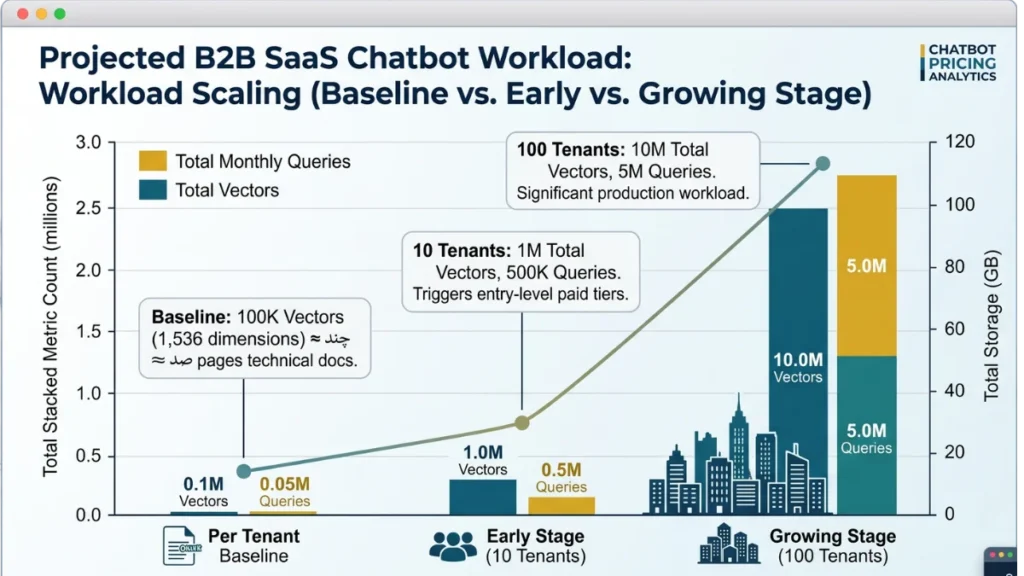
Instead of scaling by arbitrary total vector counts, we will scale by customer acquisition:
- Early Stage: 10 tenants (1M total vectors, 500K monthly queries).
- Growing Stage: 100 tenants (10M total vectors, 5M monthly queries).
This baseline is large enough to trigger paid tiers on managed services, but small enough that we are still dealing with startup-scale economics where a surprise infrastructure bill actually matters.
Pinecone Pricing: The Number That Matters Isn’t Just Per-Query Cost
Pinecone uses a strictly usage-based serverless architecture. While they offer a $20/month “Builder” plan, it lacks production necessities like RBAC and backups. For a real SaaS, you need the Standard plan, which carries a $50 per month minimum usage commitment.
If your actual usage is $12, you still pay $50. If your usage is $60, you pay $60.
Beyond the minimum, Pinecone bills three distinct metrics:
- Storage: $0.33 per GB/month.
- Write Units (WUs): $4.00–$4.50 per million.
- Read Units (RUs): $6.00–$6.75 per million.
Let’s run our Early Stage workload (10 tenants = 1M vectors, 500K queries).
- Storage: 1M vectors takes roughly 10 GB including index overhead. At $0.33/GB, storage is $3.30.
- Writes: 100,000 writes is roughly 100,000 WUs. At $4.25 per million, this is $0.43.
- Reads: 500,000 queries. Assuming 1 RU per query, 500,000 RUs at $6.50 per million is $3.25.
Your total raw usage is roughly $6.98. Because you are on the Standard plan, Pinecone bills you $50.00. You are effectively paying a massive premium per query just to keep the production lights on at this scale.
Why Namespace Size Changes the Economics
Pinecone does not charge a flat fee per query. Read Units are calculated based on the size of the targeted namespace, with a hard minimum cost of 0.25 RUs per query.
Because search cost grows sublinearly with namespace size, querying a single massive namespace is generally cheaper per-query than querying many tiny namespaces. If you use namespaces for strict multi-tenancy and a specific tenant only has 5,000 vectors, querying their namespace still costs the 0.25 RU minimum.
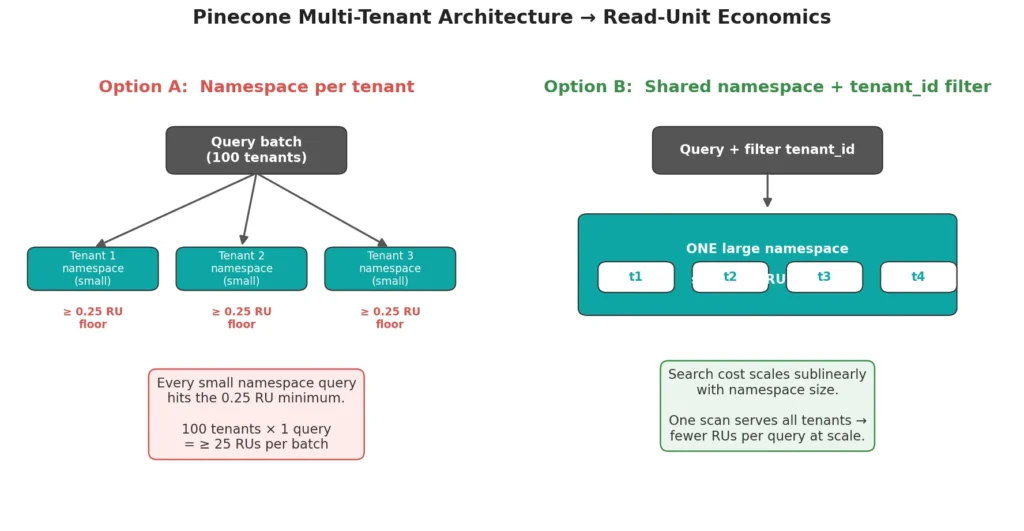
If you run a batch-query against 100 isolated tenant namespaces, you burn 25 RUs just hitting the floor. If you put all vectors into one shared namespace and filter by tenant_id metadata, you allow Pinecone’s sublinear cost scaling to work in your favor, potentially lowering your RU consumption per query. Architecture directly dictates whether you hit the 0.25 RU floor or scale sublinearly.
Weaviate Cloud Pricing: Pay for Capacity, Dimensions and Storage
Weaviate Cloud’s Flex plan requires a $45/month minimum. Unlike Pinecone’s read/write unit abstraction, Weaviate bills primarily on vector dimensions and object storage.
For 1,536-dimensional embeddings, 100,000 vectors equals roughly 153.6 million dimensions. At the current base Flex rate of roughly $0.00465 per 1M dimensions, the vector footprint is about $0.71.
Crucially, Weaviate explicitly states that the $45/month minimum includes your vector dimensions and storage. Your raw usage is well under the floor, so you pay $45. Backups are billed additionally based on volume.
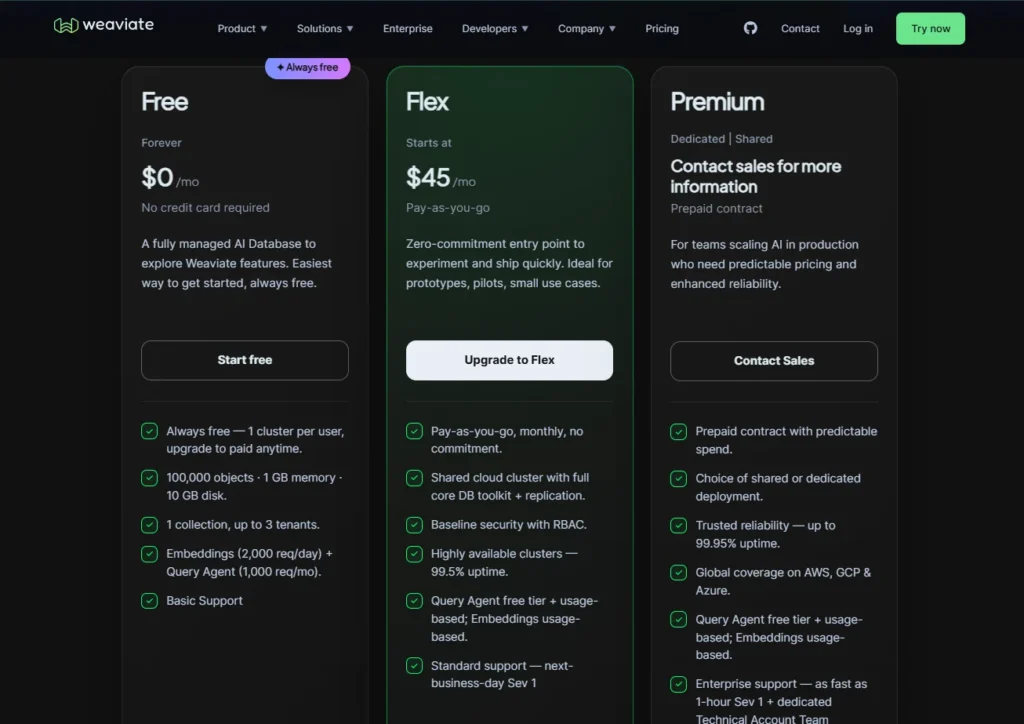
Where Weaviate’s economics get tricky is configuration. If you enable replication for high availability, your dimension and storage costs multiply. If you use product quantization (compression), Weaviate discounts the list price for those dimensions because they consume less compute during search.
Unlike Pinecone, Weaviate does not meter individual queries. A read costs the same whether it scans a massive shared index or a tiny, isolated tenant collection. This flat-read model makes Weaviate economically safer for high-frequency queries against small, isolated multi-tenant datasets.
pgvector: Free Extension, Not Free Infrastructure
pgvector is an open-source PostgreSQL extension. There is no separate vector-database license fee; you pay for the PostgreSQL infrastructure running it.
For a concrete managed example, let’s use the Supabase Pro plan, which starts at $25/month. This base price includes 8 GB of disk space and $10 in compute credits (covering a basic Micro compute instance).
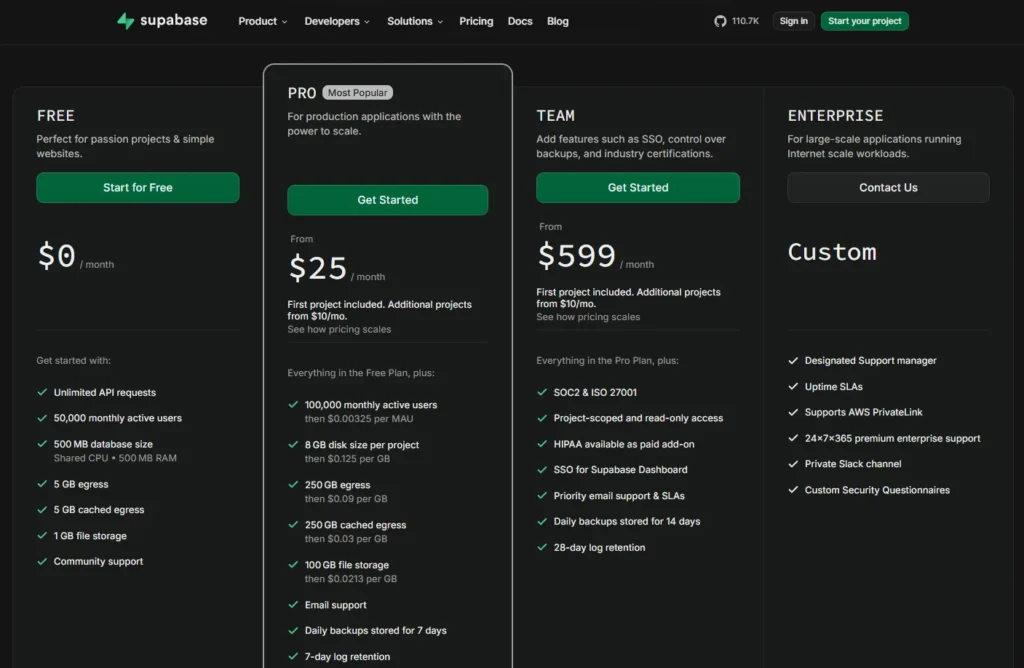
Our 100,000-vector baseline requires roughly 600 MB of raw vector storage. Adding an HNSW index brings total disk usage to around 1 GB. This fits comfortably inside the included 8 GB quota, meaning your marginal storage cost for vectors is $0.
The hidden cost is memory. HNSW indexes suffer severe latency penalties if they cannot fit in RAM. A basic Micro instance might choke on concurrent queries against a 1 GB index. To serve this reliably, you may need to upgrade to a 2 GB or 4 GB compute instance, which burns through your included compute credits and incurs hourly overage charges.
Furthermore, you own the operational responsibility. You must manually tune index parameters (m, ef_construction), manage PostgreSQL VACUUM processes to prevent bloat, and handle index rebuilds. You are paying for infrastructure consolidation, but you are also paying with your own engineering time.
Real Cost Comparison at 1M and 10M Vectors
Exact bills depend on your specific compression and compute choices, but the economic trajectories are clear as you scale from 10 to 100 tenants.
| Factor | Pinecone | Weaviate Cloud | pgvector |
|---|---|---|---|
| Pricing model | Usage-based (Storage, RUs, WUs) | Usage-based (Dimensions, Storage) | Base subscription + Compute/Disk |
| Starting/minimum cost | $50/month | $45/month | $25/month |
| What actually drives cost | Query volume and namespace size | Vector dimensions and object count | Compute RAM and disk overage |
| Storage cost | $0.33 / GB / month | Included in minimum (overages vary) | $0.125 / GB (after 8GB included) |
| Query cost model | Pay per Read Unit (0.25 RU floor) | Unmetered reads | Unmetered (bound by compute CPU/RAM) |
| Multi-tenancy considerations | Shared namespace avoids RU floor | Native multi-tenancy doesn’t spike read costs | Requires partitioning or Row-Level Security |
| Operational responsibility | None (Fully managed) | None (Fully managed) | High (Index tuning, vacuuming) |
At 1M vectors (10 tenants), you are trapped in the minimums. Pinecone ($50) and Weaviate ($45) charge you for the privilege of being on their production tiers. pgvector (~$25–$40) wins simply because a 10GB index footprint fits easily inside Supabase’s included compute and storage quotas, requiring only a minor compute upgrade.
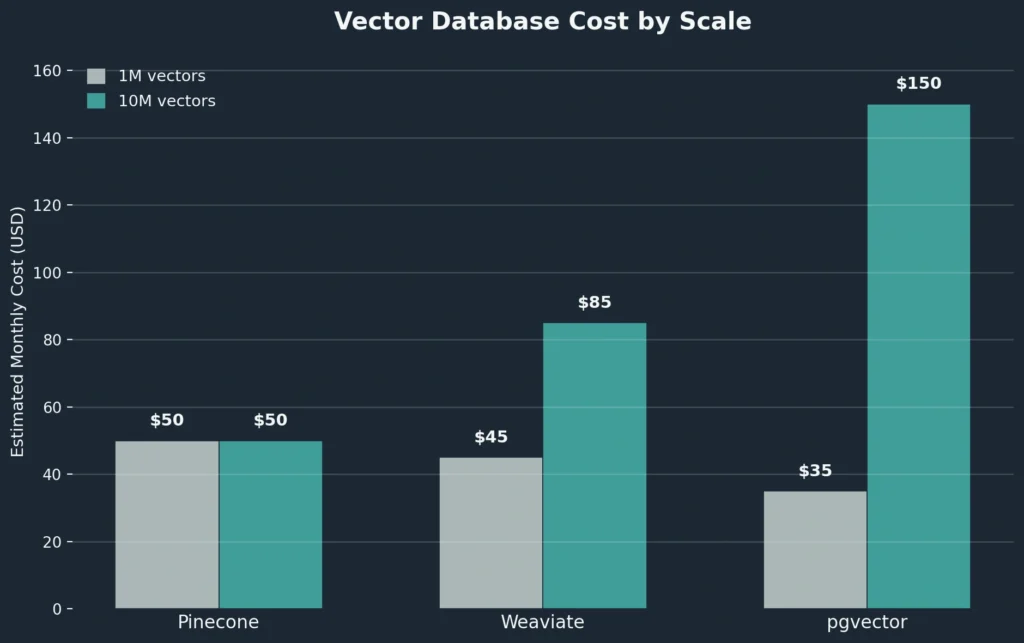
At 10M vectors (100 tenants), the models diverge. Pinecone’s raw usage (roughly $35 for 5M reads + 100GB storage) still falls under the $50 minimum, meaning you are effectively getting massive scale for a flat $50 fee. Weaviate’s dimensional cost crosses the minimum to roughly $71.42, pushing your bill to ~$85+ once storage and backups are added. pgvector hits ~$150+ (scenario estimate), driven by disk overages for the 92GB of excess data and the strict requirement for a high-RAM compute instance to prevent index thrashing.
The Multi-Tenant Trap Most Pricing Comparisons Miss
Pricing pages assume one massive index. Real SaaS means 100 tenants with 100,000 vectors each, and that changes everything.
Pinecone: Separate namespace per tenant means every query hits the 0.25 RU floor. Querying 100 tiny tenant namespaces costs a minimum of 25 RUs per batch. Put all vectors in one shared namespace with tenant_id metadata filtering, and you leverage sublinear scaling to lower the per-query cost. One architectural choice drastically changes your RU consumption.
pgvector: No namespaces exist. You filter by tenant_id using Row-Level Security or partitioning. A single 10M-vector table forces your HNSW index to scan across all tenants. A composite index on (tenant_id, embedding) fixes latency but bloats RAM. Table partitioning fragments the index and degrades ANN recall. Either way, you pay—through compute upgrades or degraded search quality.
Weaviate: Native multi-tenancy isolates each tenant into a shard. Reads are unmetered, so there’s no per-query penalty. The hidden cost is memory: thousands of shards require node resources. Under-provision the cluster and latency spikes regardless of billing.
Vector count alone tells you nothing. Tenant topology determines your actual bill.
Your Vector Database Isn’t Your Whole Chatbot Bill
A $50 vector database bill does not mean your SaaS costs $50 to operate. A RAG chatbot infrastructure bill is heavily layered.
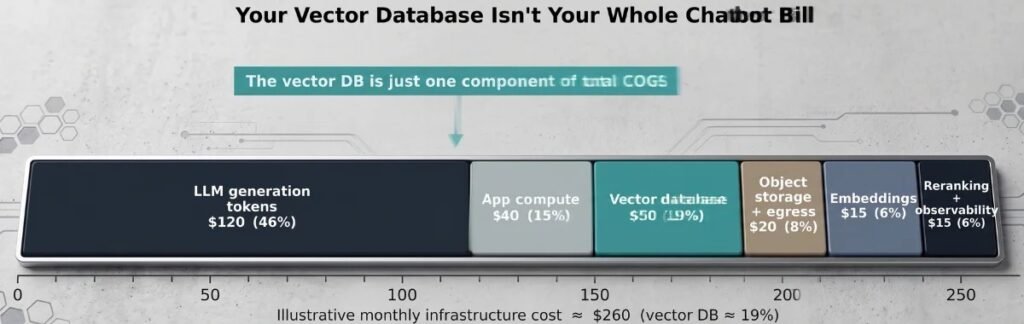
Before a query even hits your vector database, you pay for embedding generation (e.g., OpenAI text-embedding-3-small at $0.02 per 1M tokens). Once vectors return to your application, you pay for LLM generation (e.g., GPT-4o or Claude at $1.50 to $15.00 per 1M input tokens, plus output token costs).
You also pay for the application server hosting your API, object storage for the original source documents, and observability tools to log token usage and trace retrieval errors.
What the Numbers Actually Mean for a $50/Month SaaS
There is no universal winner here. There is only the database that aligns with your engineering constraints and billing tolerance.
Choose Pinecone if you want zero operational overhead and your architecture can consolidate tenants into shared namespaces to avoid the 0.25 Read Unit floor. The $50 minimum acts as a massive buffer, keeping your bill flat even as you scale to millions of vectors and queries.
Choose Weaviate Cloud if your workload is read-heavy and you need strict logical isolation via native multi-tenancy without being penalized per query. The $45 minimum buys you a managed environment where read volume doesn’t directly spike your bill, provided you manage your dimensional footprint and compression.
Choose pgvector if you are already building your SaaS on PostgreSQL and want to consolidate infrastructure. You save on the $45–$50 managed vector DB minimums by leveraging your existing database plan, but you pay the tax in engineering hours spent tuning HNSW parameters, managing RAM, and handling multi-tenant partitioning.
Before committing to an architecture, map out your tenant topology and run the arithmetic. The cheapest database on paper is rarely the cheapest in production. 🙂
One Comment