
Invoice Data Extraction with GPT-5.4-Mini: Why You Should Build, Not Buy
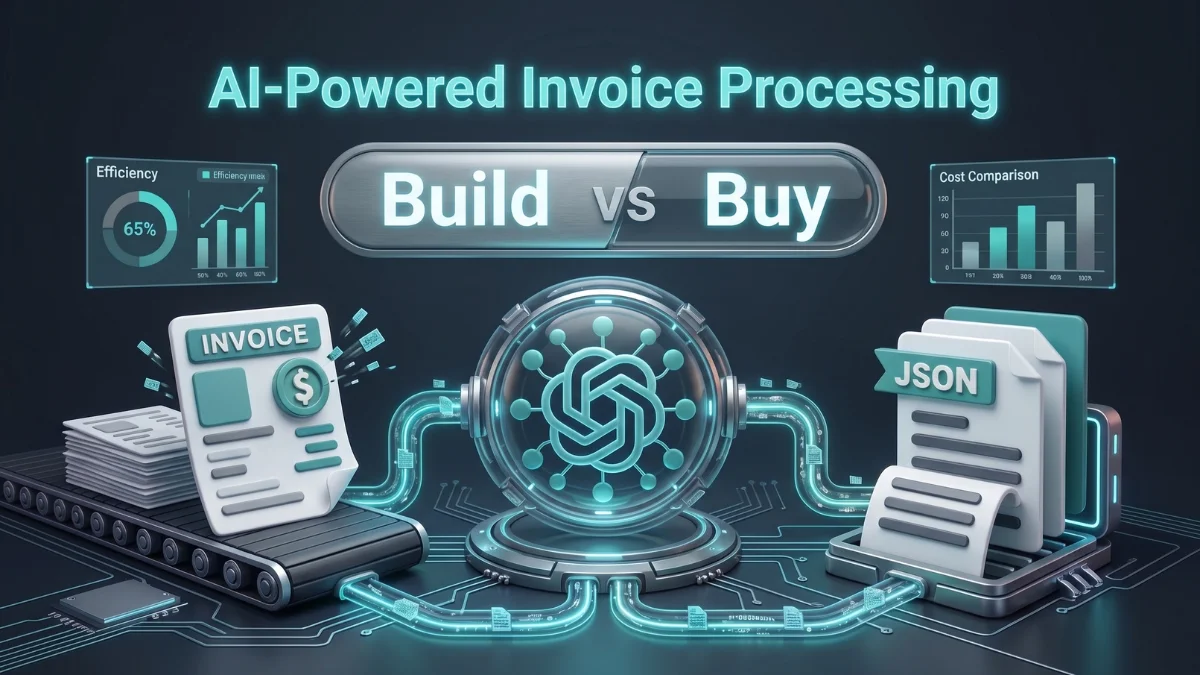
Until recently, building an in-house invoice data extraction pipeline meant managing brittle OCR engines. Today, lightweight models with built-in multimodal reasoning change the scenario entirely.
If you are still buying a proprietary document extraction tool, you are paying a premium for data extraction you can easily build yourself. Here is how to build a production-grade invoice parser with GPT-5.4-Mini.
1. Introduction
In the past, agencies relied on paid invoice parsers and proprietary data extractors. Early LLMs lacked native PDF support, layout vision, and the ability to guarantee data output against a defined schema, all while carrying high API costs. Today, modern lightweight LLMs have flipped the script with native multimodal vision, low-cost APIs, and reliable structured JSON outputs.
Beyond economics, building an in-house pipeline solves a critical enterprise vulnerability: data privacy. Using third-party SaaS tools requires handing over sensitive financial data to an external provider. Moving to a self-built pipeline ensures you retain total control over your data environment.
2. The Architecture: Invoice Data Extraction
Traditional intelligent document processing (IDP) pipelines are notoriously over-engineered. They typically require a fragile chain of disconnected tools:
[Invoice PDF] ➔ [OCR Engine] ➔ [Text Bounding Boxes] ➔ [RegEx / Heuristics] ➔ [JSON Output]If a vendor changes a font or shifts a table line by 10 pixels, the entire pipeline shatters. That’s why these parsers usually ask you to give your data in a particular format, and you have to follow that.
By leveraging GPT-5.4-Mini, we compress this multi-stage complexity into a unified, single-hop multimodal pipeline. Because the model natively understands both visual layouts and text tokens simultaneously, the architecture simplifies to three clean phases:
[Invoice PDF/Image] ➔ [Extraction Instructions + GPT-5.4-Mini API + Pydantic Schema] ➔ [Validated JSON]The Three Core Components
- The Ingestion Layer: Raw PDFs or image formats (PNG/JPEG) are read and converted into standard base64 byte streams. No manual pre-processing, contrast adjustments, or external OCR engines are needed.
- The Inference & Extraction Engine: The base64 data is passed directly to the
gpt-5.4-minimodel alongside an explicit structural contract (such as a Pydantic model or JSON schema specification). - The Enforcement Layer: The API natively guarantees that the output matches the exact shape of your database schema. If an invoice contains irregular structures or nested tables, the model handles the semantic alignment internally, outputting clean, structured JSON ready for ingestion.
3. Crafting Data Extraction Prompt
When building a custom pipeline, the prompt acts as your data validation boundary. With an advanced model like gpt-5.4-mini, you do not need to explain how to read a document. Instead, your prompt must focus entirely on enforcing structural rules, dealing with missing data, and defining formatting edge cases.
The System Prompt Blueprint
Here is the exact production-ready system prompt layout for zero-shot invoice processing:
You are an expert financial data extraction engine. Your job is to analyze the provided invoice image or document and extract data into a highly precise structured JSON format.

Adhere to the following strict parsing rules:
1. Currency Enforcement: Identify the primary currency (e.g., USD, PKR, EUR). Do not include currency symbols in numeric fields.
2. Missing Fields: If a specific field (e.g., tax_id or purchase_order) is not visible anywhere on the document, return null. Do not hallucinate or invent data.
3. Line Item Granularity: Extract every single row in the invoice itemization table. For each item, capture the description, unit price, quantity, and total line amount.
4. Date Standardization: Convert all dates into standard ISO-8601 format (YYYY-MM-DD).
5. Numerical Precision: Store all prices, subtotals, taxes, and grand totals as floats with exactly two decimal places.Why This Design Scales
- Eliminates Post-Processing: Forcing ISO dates and clean floats directly at the model boundary prevents your application logic from breaking due to regional string variations (like
12/05/2026vs05/12/2026) - Protects Against Hallucinations: Explicitly mapping missing elements to
nullstops lightweight models from guessing missing dates or matching random digits to phone numbers. - Simplifies Table Parsing: Giving clear rules on line item loops instructs the model’s visual attention mechanism to sweep through complex, multi-row tables without skipping hard-to-read line descriptions.
4. Implementation: Extracting Structured JSON Data
To make our pipeline enterprise-ready, we need to enforce a strict data contract. We achieve this by combining Pydantic with the OpenAI API’s native structured outputs feature (response_format). This guarantees that the model’s output perfectly conforms to our backend data models without requiring any manual JSON parsing logic.
The Code Setup
Here is a clean, minimal Python implementation that converts a local invoice image or PDF into a fully validated Python object. Of course, you have to wrap this into a proper backend using Flask or FastAPI:
import base64
from typing import List, Optional
from openai import OpenAI
from pydantic import BaseModel, Field

# 1. Define the structural data contract
class LineItem(BaseModel):
    description: str = Field(description="The name or description of the product/service")
    quantity: int = Field(description="The number of units purchased")
    unit_price: float = Field(description="The price per single unit")
    total_amount: float = Field(description="The calculated subtotal for this item row")

class InvoiceSchema(BaseModel):
    invoice_number: str = Field(description="The unique alphanumeric identifier of the invoice")
    vendor_name: str = Field(description="The company or person issuing the invoice")
    invoice_date: str = Field(description="The date issued in YYYY-MM-DD format")
    line_items: List[LineItem] = Field(description="List of all individual items billed")
    tax_amount: Optional[float] = Field(
        default=None,
        description="The calculated tax total, or null if none is present"
    )
    grand_total: float = Field(description="The absolute total amount due")

# 2. Initialize client and encode function
client = OpenAI()

def encode_image(image_path: str) -> str:
    with open(image_path, "rb") as image_file:
        return base64.b64encode(image_file.read()).decode("utf-8")

extraction_prompt = """
You are an expert financial data extraction engine. Analyze the provided invoice
image or document and extract data into a highly precise structured JSON format.

Adhere to the following strict parsing rules:
1. Currency Enforcement: Identify the primary currency. Do not include currency symbols in numeric fields.
2. Missing Fields: If a specific field is not visible anywhere, return null. Do not hallucinate.
3. Line Item Granularity: Extract every single row in the invoice itemization table.
4. Date Standardization: Convert all dates into standard ISO-8601 format (YYYY-MM-DD).
5. Numerical Precision: Store all prices and totals as floats with exactly two decimal places.
"""

def extract_invoice_data(file_path: str) -> InvoiceSchema:
    base64_image = encode_image(file_path)

    # 3. Call the API with the strict structural layout
    completion = client.beta.chat.completions.parse(
        model="gpt-4o-mini",  # Update to your target model name
        messages=[
            {
                "role": "system",
                "content": extraction_prompt
            },
            {
                "role": "user",
                "content": [
                    {"type": "text", "text": "Extract all data fields from this invoice strictly using the schema provided."},
                    {
                        "type": "image_url",
                        "image_url": {
                            "url": f"data:image/jpeg;base64,{base64_image}"
                        }
                    }
                ]
            }
        ],
        response_format=InvoiceSchema
    )

return completion.choices[0].message.parsed5. Production Considerations: Scaling Beyond the Prototype
A script that processes three clean invoices on a local machine is a prototype. A production-ready system must handle thousands of unpredictable, poorly scanned documents daily while keeping latency low and costs predictable.
Moving your gpt-5.4-mini pipeline into production requires addressing three critical engineering challenges.
Handling Irregular Layout Edge Cases
Real-world invoices are messy. You will encounter multi-page billing sheets, slanted smartphone photos, faded text, and overlapping table borders.
- The Validation Layer: Do not let your pipeline silently fail. Because we use Pydantic, any parsing error or missing required attribute throws a validation exception. Catch these explicitly.
- Human-in-the-Loop (HITL): Set up a fallback queue. If the API returns a validation error or flags low confidence on key balances, route that specific invoice record to a manual verification dashboard instead of crashing the pipeline.
Pipeline Reliability and Fail-Safes
Relying entirely on a single external API point creates a single point of failure.
- Exponential Backoff: Network hiccups and occasional rate-limiting happen. Implement a robust retry mechanism, add a sleep time (5-10s) during retries, respecting the provider’s rate limits in Python to cleanly recover from transient API errors.
- State Tracking: Do not process the invoices in a black box; add exceptions and logging at every stage of processing. It makes debugging easier, and you can keep an eye on the pipeline.
Cost Reduction: Maximizing ROI at Scale
Building your own pipeline removes the fixed vendor markup, but you should still actively optimize your API spend. Use these tactical adjustments to process millions of documents for a fraction of the cost:
- Image Compression: Don’t pass raw images; compress them to a resolution that will give the same quality but spend fewer tokens. Recommended size for images is 1024px.
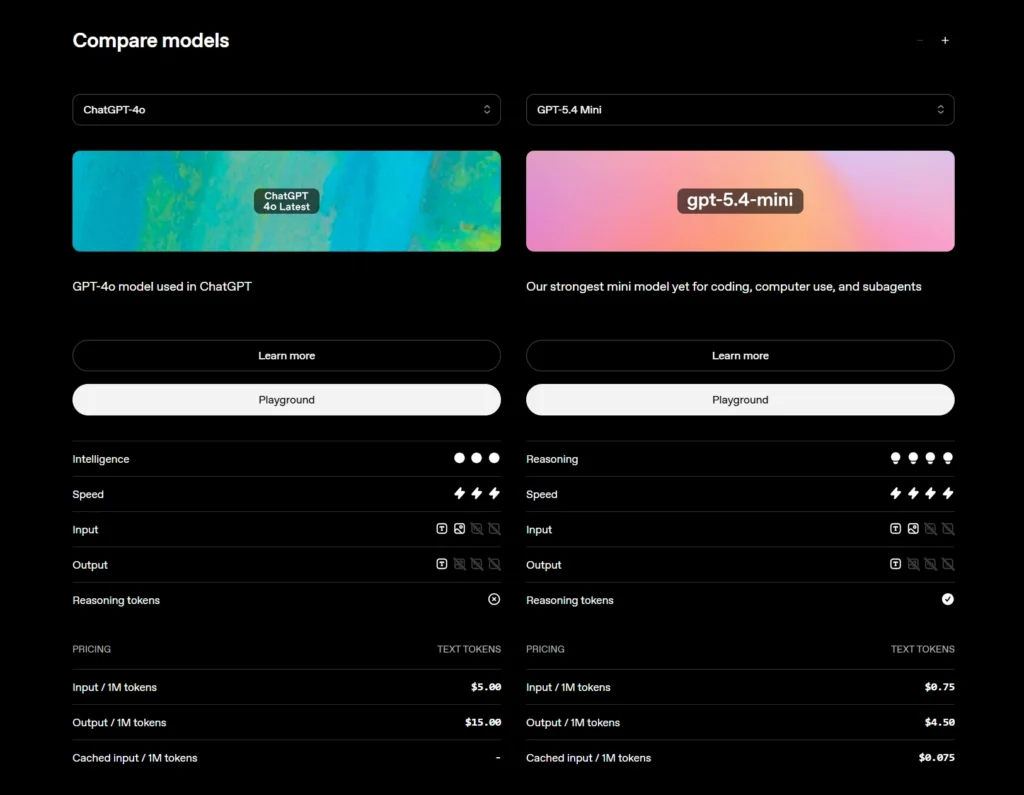
- LLM Model Selection: Use an advanced but lightweight LLM model for extraction, as we used GPT-5.4-mini instead of GPT-4o (4o is a flagship model with higher cost), and the mini model we selected outperforms legacy models.
- Heuristic Extraction: You don’t need an LLM call to extract data from Excel or CSV files that always come with a proper structure; implement heuristic extraction with built-in libraries in Python. This saves the cost of API calls.
- Leverage Prompt Caching: Keep your
extraction_promptsystem message and yourInvoiceSchemacontract identical across every single API call.gpt-5.4-miniAutomatically applies context caching for repeating headers, allowing you to save up to 50% on input token costs for high-volume batches. - Cloud Service Provider: Selecting an affordable cloud service provider, or if possible, host everything on your own local servers.
6. Cost Comparison With SaaS Tools
You must be thinking about the price comparison of SaaS tools and the solution we build using GPT-5.4-mini, and here are the details. We are going to compare 3 popular SaaS tools for document extraction with the GPT-5.4-mini solution:
|
Solution |
Monthly Cost/1000 pages |
Cost Per Page |
Notes |
|---|---|---|---|
|
GPT-5.4-mini API |
~$2.50 – $6.00 |
~$0.003 – $0.006 |
~1.5k–2.5k tokens/page (image + prompt + JSON output). |
|
Nanonets |
~$150 – $300 |
$0.15 – $0.30 |
500 free trial pages, then $0.30/page pay-as-you-go. |
|
Docsumo |
~$299 – $500 |
$0.30 – $0.50 |
Minimum platform base tier. |
|
ABBYY |
$1,000+ |
$1.00+ |
High minimum annual commitments ($6k–$15k+/yr). |
7. Conclusion: Build vs Buy
- Build if you’re a lean, tech-driven agency: you get total data privacy and run on pennies.
- Buy if you’re an enterprise lacking senior engineering: you pay for convenience, turnkey workflows, and out-of-the-box support.
By leveraging GPT-5.4-Mini, you eliminate arbitrary vendor markups, secure absolute data privacy, and deploy a system that handles complex document layouts with near-perfect accuracy. Stop outsourcing your core workflows to rigid third-party wrappers. Build your pipeline, own your architecture, and take full control of your engineering stack.